Overview
This update covers August 20 through November 8, 2026, picking up right after the last post.
We shipped xyOps v1.1 on September 20, along with the new remote CLI and filesystem synchronization tools. During this period, we added an MCP Server, interactive Server Terminals, system extensions, shared job capacity pools, job rate limits, and several workflow improvements.
The Marketplace also grew, with six new Plugins and two system extensions. There are five new Wiki guides, more documentation for developers and administrators, and a new collection of short xyOps videos on TikTok and Instagram.
Release Overview
During this window we shipped:
- 21 xyOps releases, from v1.0.93 through v1.1.15.
- 18 xySat releases, from v1.0.42 through v1.1.11.
- The new xyCLI, which has already reached v1.2.4.
- Six new Marketplace Plugins and two system extensions, bringing the catalog to 58 listings.
The full release details are available in the xyOps changelog and the xySat changelog.
Introducing xyCLI
xyCLI is a complete command-line interface for xyOps. Launch jobs, investigate failures, explore server health, manage your automation, and keep definitions in Git, all from your terminal.
The CLI connects to the xyOps REST API using an API Key, so it can run on a workstation or any other machine that can reach the conductor. It supports the same privileges and category and group restrictions as other API clients.
Running the xy command displays a dashboard with server health, active jobs, alerts, queues, and rate limits. Other commands provide job searches, live job output, completed job reports, monitoring charts, process lists, network connections, and historical snapshots.
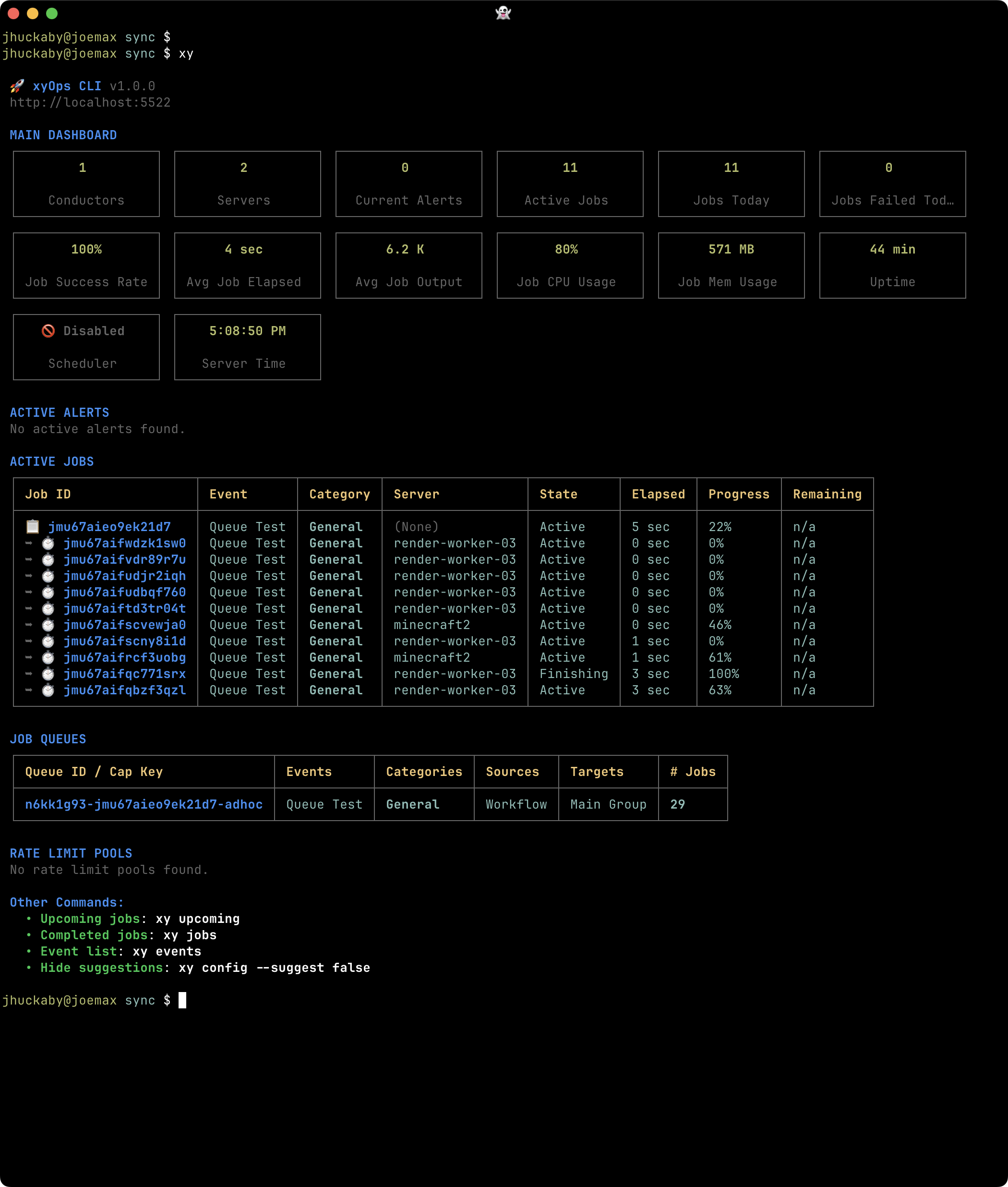
The CLI also supports creating and managing Events, Workflows, Plugins, Categories, Groups, Monitors, Channels, Web Hooks, Buckets, Secrets, API Keys, Roles, Tags, and Tickets. Jobs can be launched with parameter overrides and local input files, and live job streaming automatically follows retries.
For scripting, commands support JSON output, quiet mode, and dry-run previews where applicable. xyCLI is available through npm as @pixlcore/xycli, and there is also a Docker image at ghcr.io/pixlcore/xycli.
Read more in the xyCLI README, the Command Reference, and the Getting Started Tutorial.
Filesystem and Git Synchronization
xyCLI includes a synchronization system for keeping xyOps definitions in local files or a Git repo. Events, Workflows, Plugins, and other supported objects can be exported as individual XYPDF files, with embedded scripts extracted into adjacent source files. This makes the definitions and scripts easier to edit, review, and version in Git.
Synchronization supports pushing local changes to xyOps and pulling changes from xyOps into the filesystem. Dry-run mode previews the changes, and completion commands can automate Git commits and other follow-up operations. Two-way synchronization is also available.
The new System Activity trigger allows Events to run in response to changes inside xyOps. It can be configured for selected activity types and can exclude specific users or API Keys. Combined with Git hooks or Web Hooks, this supports synchronization triggered by edits in xyOps and pushes to a Git repository.
The documentation includes complete examples for scheduled Git synchronization and for synchronization driven by System Activity triggers. Read more in the Sync Guide, the Two-Way Git Sync Tutorial, and the Event-Driven Git Sync Tutorial.
MCP Server
The new Model Context Protocol (MCP) Server allows AI assistants to interact directly with xyOps. It provides 17 tools for working with Events, Jobs, Tickets, Alerts, Servers, and monitoring Snapshots.
The tools support searching completed jobs, reading job details and output, running existing Events and Workflows, creating and updating Events, managing Tickets, searching Alerts, and capturing monitoring Snapshots. Access is controlled by the client's xyOps API Key, including its privileges and resource restrictions. An optional read-only mode limits the available tools to read operations.
The MCP Server is included with xyCLI and supports both STDIO and Streamable HTTP. It is also available through the xyOps MCP Server Marketplace extension, which adds an /mcp endpoint to the conductor's existing URL. The extension works with Docker and manual xyOps installations and includes xyCLI as a dependency.
Read more in the MCP Server Documentation and the Conductor Setup Guide.
Server Terminals
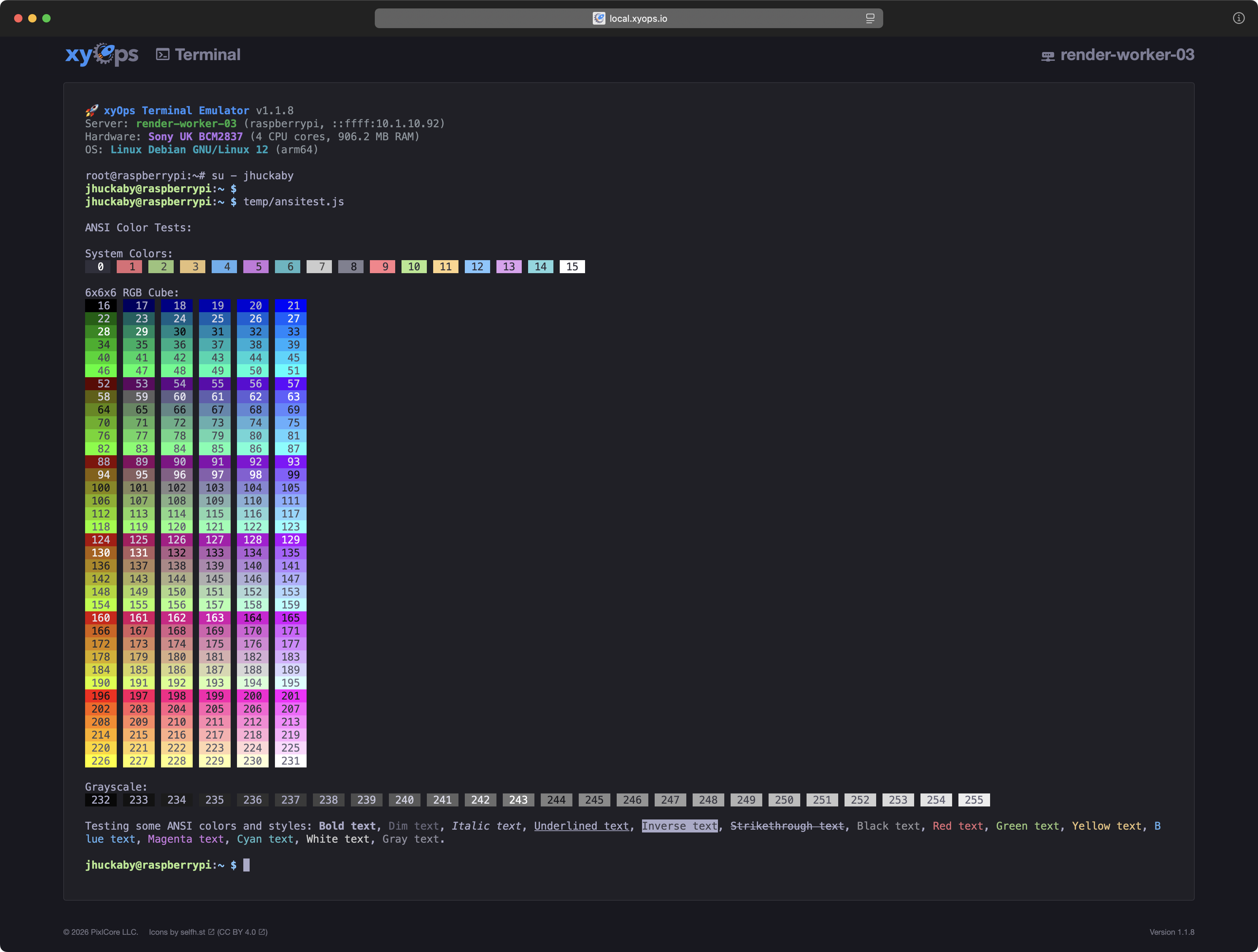
xyOps now provides interactive terminal access to worker servers directly from the web interface. Administrators can open a shell from the Server Details page or from the Job Details page for a job that ran on that server.
The terminal session runs on the worker through xySat and uses its existing connection to the conductor. Terminal access requires an online worker with terminal support. Each new session is recorded in the Activity Log with the user and server details, and access can be disabled on individual satellites using the terminal.enabled configuration setting.
The UI includes an Open Terminal button, a T keyboard shortcut, and Alt-click (Opt-click on macOS) support on server links.
Server Groups also gained a Quick Run feature. This creates a temporary multiplexed workflow that runs a custom job once on every server in the group, with the usual workflow progress and job results available in the UI.
These features were added in the Server Terminals Release and the Quick Run Release.
Workflow Improvements
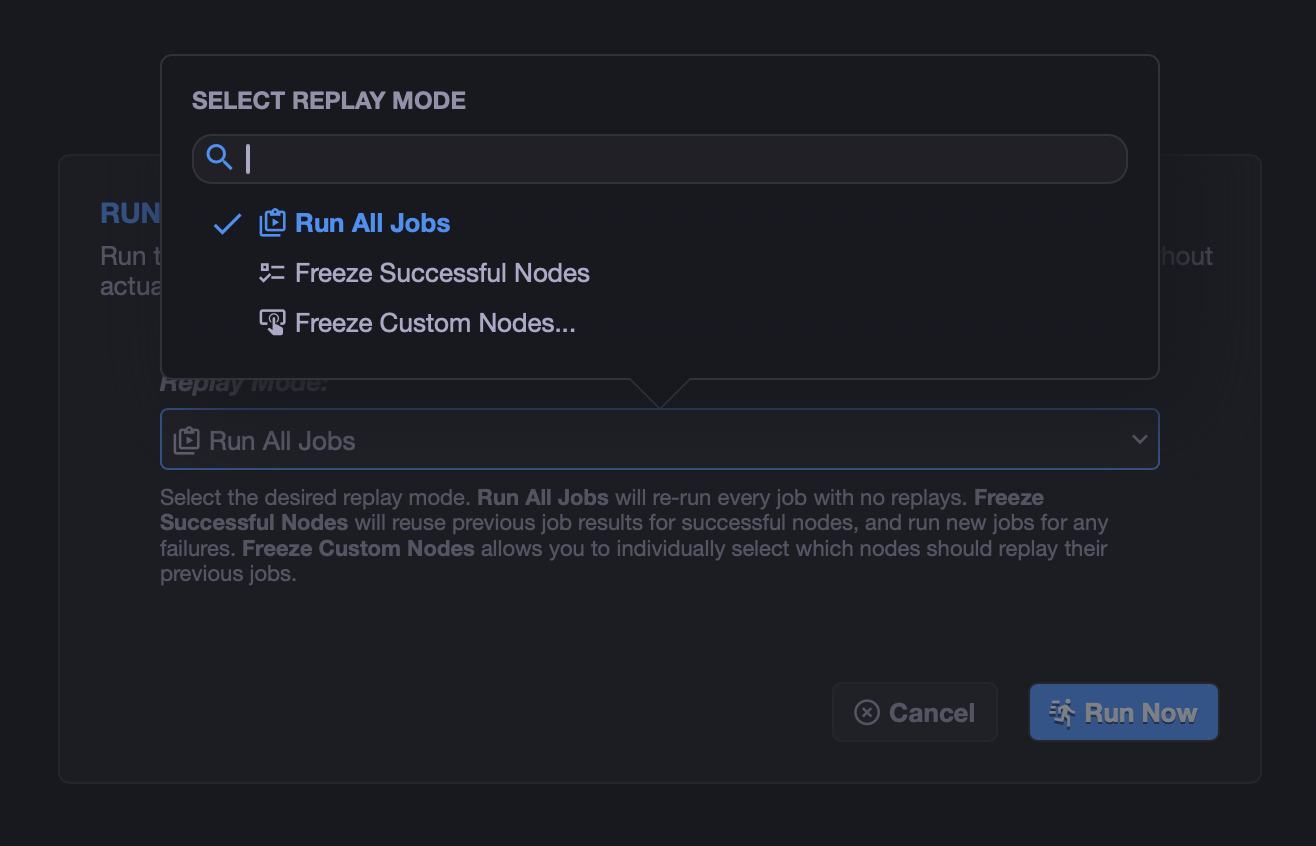
Custom workflow replay is now available from the Run Again dialog. Freeze Successful Nodes reuses previous results for successful nodes and executes new jobs for failed nodes. Freeze Custom Nodes allows individual nodes to be selected for replay. Replayed nodes reuse their previous output data and files.
Workflows also gained more control over output collection. The Workflow Bubbling setting determines which sub-job outputs are collected into the parent workflow:
- Bubble Leaf Nodes collects output data, files, user tags, and custom content from nodes at the ends of execution paths.
- Bubble All Nodes collects these outputs from all sub-jobs.
New workflows created in the UI default to leaf bubbling. Existing workflows retain their saved bubbling behavior. Intermediate results continue to pass to downstream nodes, and each sub-workflow has its own bubbling setting.
Two new options control workflow failure handling:
- First Fail Aborts requests cancellation of the remaining work when a sub-job finishes with a nonzero result, including a warning.
- Preserve Severity sets the completed workflow's result to the highest severity reported by its sub-jobs and identifies the job responsible for that result.
Completed workflows now include a Workflow Job Outputs section, which displays sub-jobs in completion order with elapsed times, output data, and logs or download links. The report can also be downloaded as Markdown.
Read more in Workflow Output and Workflow Options.
Shared Capacity and Job Rate Limits
The Max Jobs Limit now supports a Shared Capacity Key, which allows multiple Events and workflow nodes to share one concurrency pool. This provides a common execution limit for jobs that use the same database, external service, or other limited resource.
Job rate limiting was added to the same limit system. A rate limit controls how many jobs may start during a fixed window of one second, minute, hour, or day. When a Shared Capacity Key is configured, both concurrency and rate capacity are shared across the pool.
Queue limits control how many jobs may wait when concurrency or rate capacity is exhausted. The dashboard includes viewers for queues and rate pools, with the current usage and reset information available to operators.
Rate limits count job starts. Jobs that make multiple external requests need to account for those requests when choosing the rate. Read more in the Max Jobs Limit Documentation.
System Extensions
xyOps now supports system extensions for adding features to the conductor and browser UI. Extensions can register HTTP endpoints, listen for system activity, exchange WebSocket messages, add themes and icon packs, and run custom browser JavaScript.
Administrators can install extensions through the Marketplace. The System page lists active extensions and provides access to their configuration and removal controls. Extension settings can also be edited from the installed extension's Marketplace detail page.
Two extensions have been published so far:
- selfh.st Icon Pack adds more than 2,000 icons from the selfh.st collection to the xyOps icon picker.
- xyOps MCP Server hosts the MCP HTTP endpoint on the conductor and forwards each client's API Key to xyOps.
The new System Extension Development Guide covers extension APIs, configuration, local development, packaging, and Marketplace publishing.
New Marketplace Plugins
Six new Plugins arrived during this window, including four from community authors:
- LogAlert by PixlCore watches remote log files for new matching lines and routes alerts through xyOps.
- AI Diagnosis by PixlCore investigates failed jobs and workflows using AI models and read-only tools. It produces an incident report with likely causes, supporting evidence, and verification steps.
- AI Video Adherence Gate by madebysaira checks rendered video for motion, visual drift, and lip-sync problems, and returns pass, warning, or failure results for workflow branching.
- Target Online Gate by Felix Bartels (9wd) skips scheduled launches while all targets are offline, while allowing one job to wait in the queue for a target to return.
- SIGNL4 by Derdack GmbH sends job and Event results to SIGNL4 for mobile alerting, on-call routing, acknowledgements, escalation, and alert resolution.
- Telegram Notify by Ekrem KAYA sends alert and job notifications to Telegram through a bot.
Thank you to all of the Plugin authors and maintainers for contributing to the Marketplace!
New Wiki Guides
Five new Wiki guides were added since the last update:
- Job Rate Limits explains fixed-window job rate limits, shared capacity keys, queues, workflow behavior, and conductor recovery.
- Managing Background Services covers starting, stopping, monitoring, and recovering long-running services, including integration with service managers such as systemd.
- Customize UID Per Event describes administrator-locked user and group parameters for running Events under different Unix accounts, including the optional sudo wrapper for supplemental groups.
- S3 File Processor documents a workflow for polling an S3 bucket, downloading files, and launching processing jobs, with automatic cleanup of empty polling runs.
- Workflow Bubbling Migration explains the workflow output collection modes, compatibility with existing workflows, and the related isolation and failure handling options.
Hosting and Satellite Improvements
The xyOps and xySat Docker images and the packaged xySat distribution moved to Node.js v24. Manual xyOps installations now require Node.js v22.12.0 or later.
Upgrade dialogs now display release notes for both xyOps and xySat. The November releases also corrected satellite upgrades that could leave stale nested Node.js dependencies behind.
xySat now caches its network interface list and uses a faster interface lookup on Linux. Monitoring cycles are prevented from overlapping, and Windows service startup, shutdown, and background task scheduling received several fixes.
These changes are covered in the xySat Changelog.
Stability and Security Fixes
There were also several fixes to scheduling, authentication, input handling, and dependencies:
- The scheduler now handles the repeated hour during the daylight saving time fall-back transition, including both occurrences of a matching local schedule.
- API Keys in URL query strings are disabled by default. API clients can use the
X-API-Keyheader or the supported JSON request body authentication. - Runtime targeting and execution APIs enforce group restrictions across the requested targets.
- User role changes require administrator privileges.
- xyOps and xySat use secure JSON parsing at input boundaries (to prevent prototype pollution).
- The HTTP Request Plugin more thoroughly redacts secrets from diagnostic output.
- Magic Link parameter validation and HTML handling were hardened.
- Dependency updates addressed upstream security issues and logging reliability.
The documentation was expanded alongside these changes. Read more in the API Authentication Reference and the Daylight Savings Time Recipes.
New Video Channels
We launched PixlCore Media on TikTok and Instagram! We are sharing short videos about xyOps features, workflow techniques, and automation ideas, alongside our existing YouTube channel.
If you find the videos useful, please consider leaving a like, following us, or subscribing on YouTube. It helps more people discover xyOps, and I really appreciate the support.
- TikTok: @pixlcoremedia
- Instagram: @pixlcoremedia
- YouTube: PixlCore Media
Community
Thank you to everyone who reported bugs, requested features, contributed Plugins, or shared feedback. Please join the community and help improve xyOps:
- GitHub Discussions: Discussion Board
- Reporting Bugs: GitHub Issues
- Reddit: r/xyOps
- Discord: Join the Server
- Bluesky: PixlCore
- Mastodon: @pixlcore
- LinkedIn: PixlCore
- RSS Feed: pixlcore.com/feed.rss
Hope to see you there! Come and say hi!